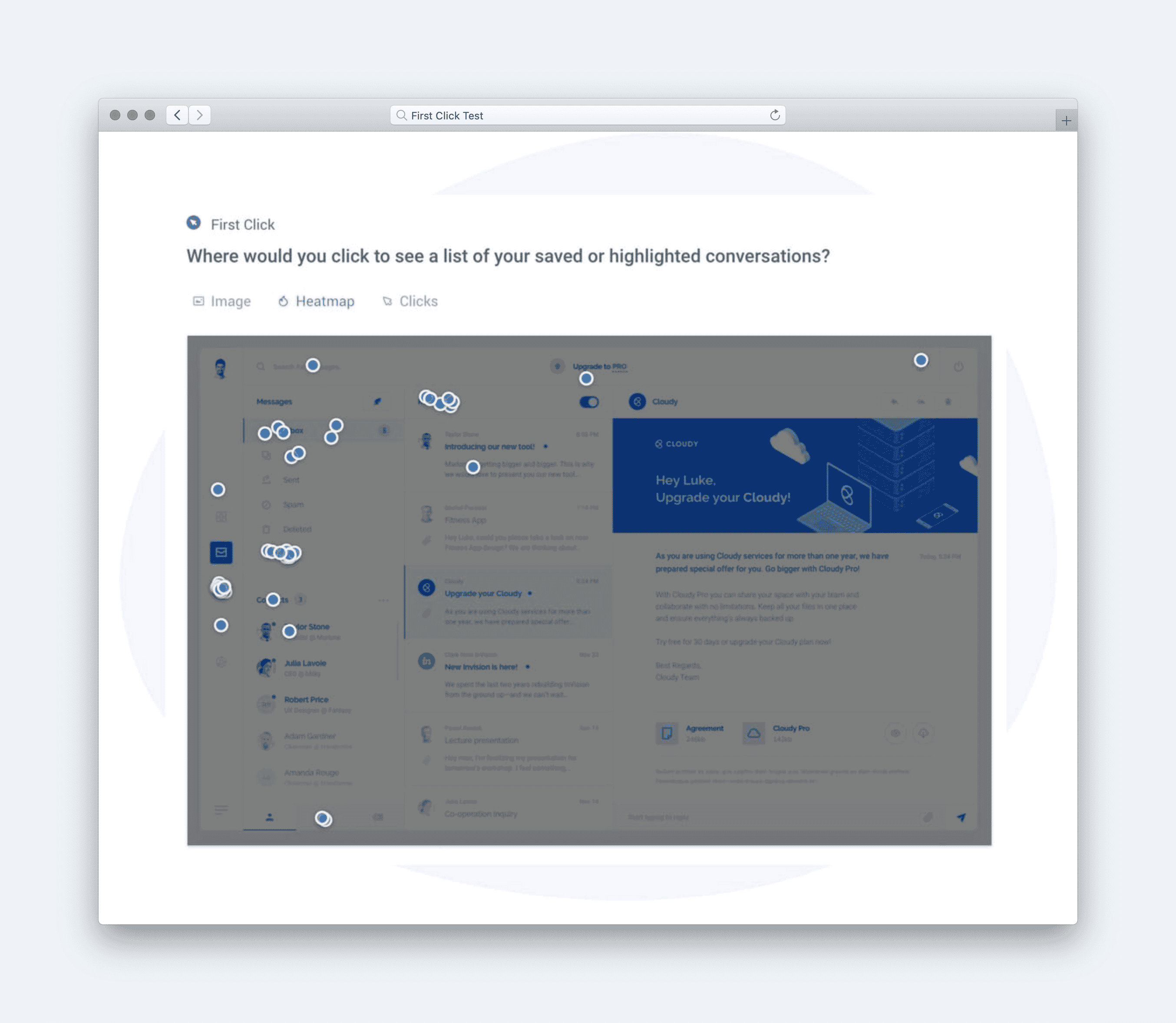
Usability measures how many users can complete a full series of tasks within a flow. It focuses on multi-step performance and shows how well the experience holds up across an entire journey.Use this metric when testing checkouts, onboarding sequences, or multi-step forms where several interactions need to work together. It helps you find the exact points where people get stuck or drop off.Usability reflects how well your design supports smooth, complete task completion from beginning to end. It gives a clear view of overall performance, not just isolated steps.Interpreting the ResultsUse this key to understand what your Usability score means and how to interpret that for your product experience:How to Calculate UsabilityThe Usability metric evaluates how easily users can complete a set of key actions on a page, based on success rates across multiple click-based tasks.Set up questionsUse click tests to direct users to take different actions on a page (e.g., selecting size, viewing product details, or adding to cart).Each test should define a correct clickable hotspot. These tasks can be combined into one usability test and shared with your target audience through a remote testing platform.Collect dataYour click test may produce a data report like this heatmap, which shows the concentration of user clicks across the page:Or simply a data report where clicks are recorded and classified as either correct (clicked the designated hotspot) or incorrect.Plug data into the formulaThe Usability score is calculated using this formula:Each Success Score is calculated by dividing the number of correct clicks by the number of participants for that task. Once you have three or more success scores, average them to get the overall Usability score.Calculate the Usability scoreFor this task:Action 1 Success = 92%Action 2 Success = 90%Action 3 Success = 85%This results in a Usability score of 89%, which is considered Good on a scale from Very Poor to Very Good. It suggests that users can reliably and accurately complete multiple key actions on the product page without confusion.When to Use Usability MetricsUsability metrics help evaluate how easily users can interact with key features, workflows, or content. These metrics identify pain points and optimize designs to improve efficiency, satisfaction, and success rates. By tracking usability, teams can reduce friction, minimize errors, and increase task completion. Here are some common use cases for measuring usability:Form Completion or WorkflowsAnalyze how efficiently users complete forms or multi-step workflows. Usability metrics identify confusing inputs, excessive steps, or unclear instructions that hinder task completion.CheckoutsMeasure user success rates and friction points during the checkout process, such as cart abandonment, payment failures, or unclear instructions. Usability metrics help streamline the flow and reduce drop-offs.Interactive Elements and ToolsMeasure how well users interact with features like filters, search tools, sliders, or carousels. Usability metrics ensure these elements enhance, rather than hinder, user experiences.How We Measured Usability of Getup’s Product Details PageTo assess how easy it is for users to interact with key elements on Getup’s Product Details Page (PDP), we ran a multi-action usability test. This page serves as the main interaction point for online shoppers selecting product details like size, color, and cart actions—making it essential that each interaction path is straightforward.The SetupUsability is measured by testing a series of actions across the same design. Participants are prompted with distinct task directives—like:Select your sizePick a color optionAdd this item to your cartEach directive is evaluated for success or failure, and these are then averaged together to produce an overall Usability score.The ResultsOur click test produced the following results:We plugged the data into the Usability formula to reveal the score:The PDP earned a Usability score of 89%, rated Good on the Glare scaleAction 1 (92%) and Action 2 (90%) both showed strong success, indicating users easily identified key options for selecting product variationsAction 3 (85%)—adding the item to cart—had slightly lower success, with some confusion around the visibility or labeling of the CTAHeatmaps revealed that participants focused their clicks effectively across the correct interface areas, but small distractions around the page footer and image section were observedThe ImpactThis Usability test gave the Getup team clear confidence that their product details page was performing well, especially for core shopping actions. Still, the just-under-90% score suggested a few refinements—like increasing contrast or clarity of the “Add to Cart” button—could push the design from Good to Very Good, eliminating last bits of user hesitation.SourceHelio SurveyCSVHow to Use AI to Measure UsabilityUsing the first-click test outlined in the How to Calculate section above, gather responses on a survey from an audience of at least 100 respondents. We find that 100 responses is statistically significant in most markets. Once the responses are collected, download the CSV file of your data report and upload it into an AI platform along with the prompt below.Copy this AI prompt to calculate your own Usability score, and check out the type of output it would produce:Technicals for Measuring UsabilityWe’ve built out a UX Metric framework that we’re using in our Helio platform. Here, we’ve laid out what we’ve done, and how other developers can use this. You can also become a Glare Code Contributor on ourUX Metric framework.Data StructureHere’s a breakdown of all the properties within the Usability data model:Completion RateCompletion rate defines the percentage of users who successfully completed a task or series of tasks.ErrorsThis property tracks the number of errors users made while attempting the task(s).Time on TaskThis measures the time it takes for users to complete a task, usually captured in seconds or minutes.[\n {\n \u0022completion_rate\u0022: 0.87,\n \u0022errors\u0022: 2,\n \u0022time_on_task\u0022: 45.6\n },\n {\n \u0022completion_rate\u0022: 0.91,\n \u0022errors\u0022: 1,\n \u0022time_on_task\u0022: 30.4\n }\n]Parsing DataParsing data from a usability test involves several key components that define the success of a user's interaction with the product. This data includes metrics likecompletion rate,error count, andtime on task.Thequestionsparameter for usability testing should contain the following:These key metrics can then be aggregated and returned as part of a structured object to measure overall usability.class UxMetric\n def usability_score(questions)\n task_questions = questions.first\n\n completion_rate = task_questions['completion_rate']\n errors = task_questions['errors']\n time_on_task = task_questions['time_on_task']\n\n # Calculate the usability score based on the completion rate and errors\n usability_score = (completion_rate * 100) - (errors * 10)\n\n # Time efficiency factor, lower is better\n efficiency = (time_on_task / 60)\n\n {\n completion_rate: completion_rate,\n errors: errors,\n time_on_task: time_on_task,\n usability_score: usability_score,\n efficiency: efficiency\n }\n end\nend\nValidationValidation of Usability metrics involves ensuring the integrity of data collected from users during the task-based test. We check that every task question includes a valid set of metrics such ascompletion rate,errors, andtime on task.The function below ensures that the usability test includes a valid question type (Click Test or Prototype Directive) and all the necessary metrics. If any of the parameters are missing, the function returnsfalse.function isValidUsabilityQuestions(questions) {\n const taskQuestion = questions[0];\n\n // Validate the necessary fields for usability data\n if (!taskQuestion.completion_rate || !taskQuestion.errors || !taskQuestion.time_on_task) {\n return false;\n }\n\n // Ensure that completion rate and errors are within reasonable bounds\n if (taskQuestion.completion_rate \u003e 1 || taskQuestion.completion_rate \u003c 0 || taskQuestion.errors \u003c 0) {\n return false;\n }\n\n return true;\n}\nScore TranslationOnce the data is collected and validated, we translate the usability score into actionable categories based on predefined thresholds:This score translation helps quickly categorize user interactions and identify areas that need improvement.function translateUsabilityScore(score) {\n if (score.completion_rate \u003e 0.9 \u0026\u0026 score.errors \u003c 2 \u0026\u0026 score.time_on_task \u003c 30) return 'High';\n else if (score.completion_rate \u003e= 0.7 \u0026\u0026 score.errors \u003c 5 \u0026\u0026 score.time_on_task \u003c 60) return 'Moderate';\n else return 'Low';\n}\nTemplates & Presentation MaterialsCreate effective presentation slides, document design concepts, and implement UX Metrics with templates and resources.We've done the work to provide professional layouts that communicate to your stakeholders. UX Metric cards clearly communicate the totals, allow space for breakdowns, and styled to allow for your own brand.Visit Findings for TemplatesTake This Further with the UX Metrics AI SkillsUsability measures how easy your product is to use based on what users actually do. TheUX Metrics AI Skillsis a package you load into your LLM so you can ask questions and get expert answers anytime.Find out where your product is hardest to useChoose the right usability metrics for your research goalsCompare usability scores across designs or releasesTurn usability findings into clear design recommendationsDrop it into your LLM and start asking questions right away.
Usability
Related links

NN/g video with Raluca Budiu on the System Usability Scale, how to administer the 10-item survey, and how to interpret the score. Useful when training a team to use SUS in usability tests.
Explains how to test design concepts on both emotional fit and usability, using preference tests with keywords to see if the design sends the right message. Useful when picking between design directions and you want feedback grounded in user reaction.
Nikki Anderson-Stanier walks through eleven usability testing metrics like task success, time on task, confidence, and SUS. Useful when a researcher wants quantitative numbers to pair with qualitative findings.
Identify where decision quality breaks down
The Glare Design Assessment helps teams spot weak validation, stakeholder friction, alignment gaps, and assumptions that scale without measurable learning—so you have a clearer starting point for improvement.
About 5 minutes · Team-based · Diagnostic snapshot you can act on
Take the Design Assessment