Expectations tells you how closely the experience matches what users thought would happen. It captures the gap between what they assumed and what the design actually delivered.Use this metric when testing concepts, onboarding flows, or redesigns where users come in with assumptions. It’s especially helpful for spotting moments of surprise, confusion, or confirmation.Meeting expectations builds trust and makes the experience feel smooth. Missing them often reveals problems with communication, structure, or clarity in the design.Interpreting the ResultsUse this key to understand what your Expectations score means and how to interpret that for your product experience:How to Calculate ExpectationsThe Expectations metric captures how closely a user’s experience matches what they originally anticipated, based on a before-and-after reflection.Set up questionsUse two types of questions to gauge expectations of your user experience: a free response and Likert scale rating.Free response: When you click 'Set Event Details' on this page, what do you expect to happen?Collect dataHere's what the results might look like from your free response and Likert scale questions:Participant quote:"It'd provide information about the event, like the location, time and weather to help you select proper clothing"Plug data into formulaAfter collecting responses from participants on a survey, utilize the following formula to calculate the expectations users have for your product:Calculate the Expectations scoreUsing the provided data:This gives an Expectations score of 81%, which is considered Good on a scale from Very Poor to Very Good. It suggests that the majority of participants felt the experience met or exceeded what they were expecting.When to Use Expectation MetricsExpectation UX metrics help evaluate how well your product design aligns with user expectations, ensuring that interactions, functionality, and content feel intuitive and predictable. By identifying areas where user expectations are not met, you can make targeted adjustments to improve usability and trust. Meeting user expectations is key to driving satisfaction, reducing churn, and building a seamless user experience. Here are some common use cases for measuring expectations:Copy and MessagingUse expectation metrics to assess whether your product’s instructions, headlines, or feature descriptions deliver on what users anticipate. If users expect a certain action or result based on your messaging but experience something different, it can lead to frustration and mistrust.Navigation and WorkflowExpectation metrics reveal whether the structure and flow of your website or app match user assumptions about how to find information or complete tasks. Tracking these metrics ensures that navigation is intuitive and workflows align with user habits.New Feature RolloutsWhen introducing new features, expectation metrics help measure whether the design and functionality align with what users assumed the feature would deliver. By gathering insights on mismatches, you can fine-tune features to better meet user needs.How Getup Measured Expectations for Their Outfit Suggestion FeatureTo help shoppers prepare for upcoming events with ease and confidence, the team at Getup launched a new feature that generates outfit suggestions based on details like event type, setting, and temperature preference. Before rolling it out site-wide, they wanted to know: Does the feature deliver on what users think it will do?To answer that question, they tested using the Expectations UX metric.The SetupExpectations is measured by first asking users to describe—in their own words—what they expect a new feature or experience to do. Then, after being shown the actual experience, users rate how well it matched their expectations using a 5-point scale ranging from Failed Expectations to Exceeded Expectations. This approach helps teams identify not just how a feature performs, but whether it delivers on the promise it communicates.The ResultsOur free response and Likert scale questions in the survey produced the following results:Participants Quotes:"I expect like a quick quiz and then some results with suggestions""I would expect it to ask questions about what type of event it was""I expect that It provides me with space to put in the event details as I would like"Likert scale:The data from the Likert scale question above was plugged into the Appeal formula to reveal the score:The feature earned an Expectations Score of 80%, considered Good80% of participants said the feature either met or exceeded what they expectedOnly 3% felt the feature fell short or failed to meet expectationsSome participants were pleasantly surprised by the feature’s intuitive toggles and clarity, calling it “a smart tool that felt tailored and flexible”A few neutral responses pointed to curiosity about how clothing suggestions would be surfaced from their own closetThe ImpactEncouraged by the high Expectations score, the Getup team focused on clarifying one of the more ambiguous options—“Suggest clothes from my closet”—by improving the onboarding tooltip. They also updated the visual design of the CTA button to better match user expectations of where the interaction begins.SourceHelio SurveyCSVHow to Use AI to Measure ExpectationsUsing the 5-point Likert scale question outlined in the How to Calculate section above, gather responses on a survey from an audience of at least 100 respondents. We find that 100 responses is statistically significant in most markets. Once the responses are collected, download the CSV file of your data report and upload it into an AI platform along with the prompt below.Copy this AI prompt to calculate your own Expectations score, and check out the type of output it would produce:Technicals for Measuring ExpectationsThe code snippets below show how UX metrics can be measured using data from a survey platform. Take a peak into the development of these metrics, and even become a contributor in ourpublic repo.How to UseParsing DataParsing data for anExpectationsmetric requires multiple levels of scoring to determine if a design or product met user expectations.These values are used to calculate the overall expectations score, as seen to the right.[\n {\n \u0022sentiment\u0022: {\n \u0022positive\u0022: 0.41,\n \u0022neutral\u0022: 0.19,\n \u0022negative\u0022: 0.04\n },\n \u0022impressions\u0022: {\n \u0022matched_very_well\u0022: 0.35,\n \u0022somewhat_matched\u0022: 0.29,\n \u0022neutral\u0022: 0.17,\n \u0022somewhat_didnt_match\u0022: 0.13,\n \u0022didnt_match_at_all\u0022: 0.06\n }\n }\n]Templates & Presentation MaterialsCreate effective presentation slides, document design concepts, and implement UX Metrics with templates and resources.We've done the work to provide professional layouts that communicate to your stakeholders. UX Metric cards clearly communicate the totals, allow space for breakdowns, and styled to allow for your own brand.Visit Findings for TemplatesTake This Further with the UX Metrics AI SkillsExpectations measures the gap between what users hoped for and what they got using survey questions turned into a single number score. TheUX Metrics AI Skillsis a package you load into your LLM so you can ask questions and get expert answers anytime.Write survey questions that surface unmet expectationsUnderstand where your product is falling shortTrack expectation gaps across releasesUse expectation scores to prioritize improvementsDrop it into your LLM and start asking questions right away.
Expectations
Related links
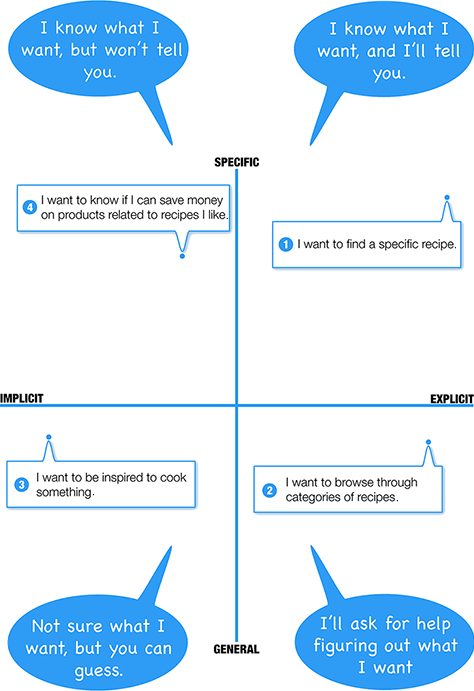
Jordan Julien explains why knowing user intent — what someone is actually trying to do — is the foundation of good UX, and how teams misread it. Useful when a team is designing flows but never asks 'what is the user trying to do here?'
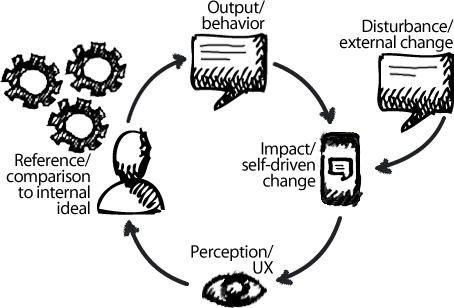
Alexandra O'Neal applies Perceptual Control Theory to UX — using control loops to discover what users are actually controlling when they use a product. Useful when a researcher wants a deeper theoretical lens on intent than 'jobs to be done' offers.
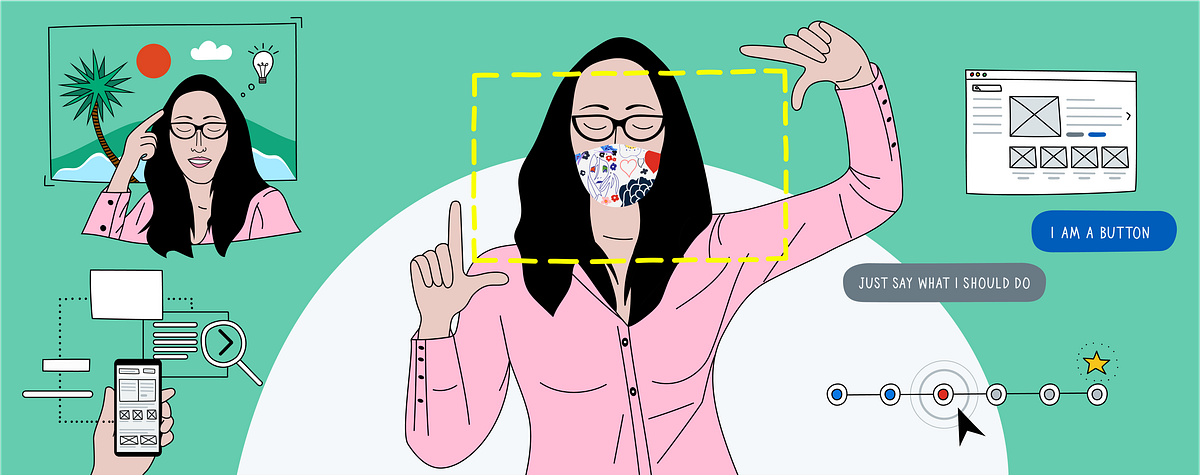
Walkthrough of how Workday uses 'intent frames' to design and analyze content with engineers early. Useful when you need a structured way to capture and test user intent before building.
Identify where decision quality breaks down
The Glare Design Assessment helps teams spot weak validation, stakeholder friction, alignment gaps, and assumptions that scale without measurable learning—so you have a clearer starting point for improvement.
About 5 minutes · Team-based · Diagnostic snapshot you can act on
Take the Design Assessment